
One task model
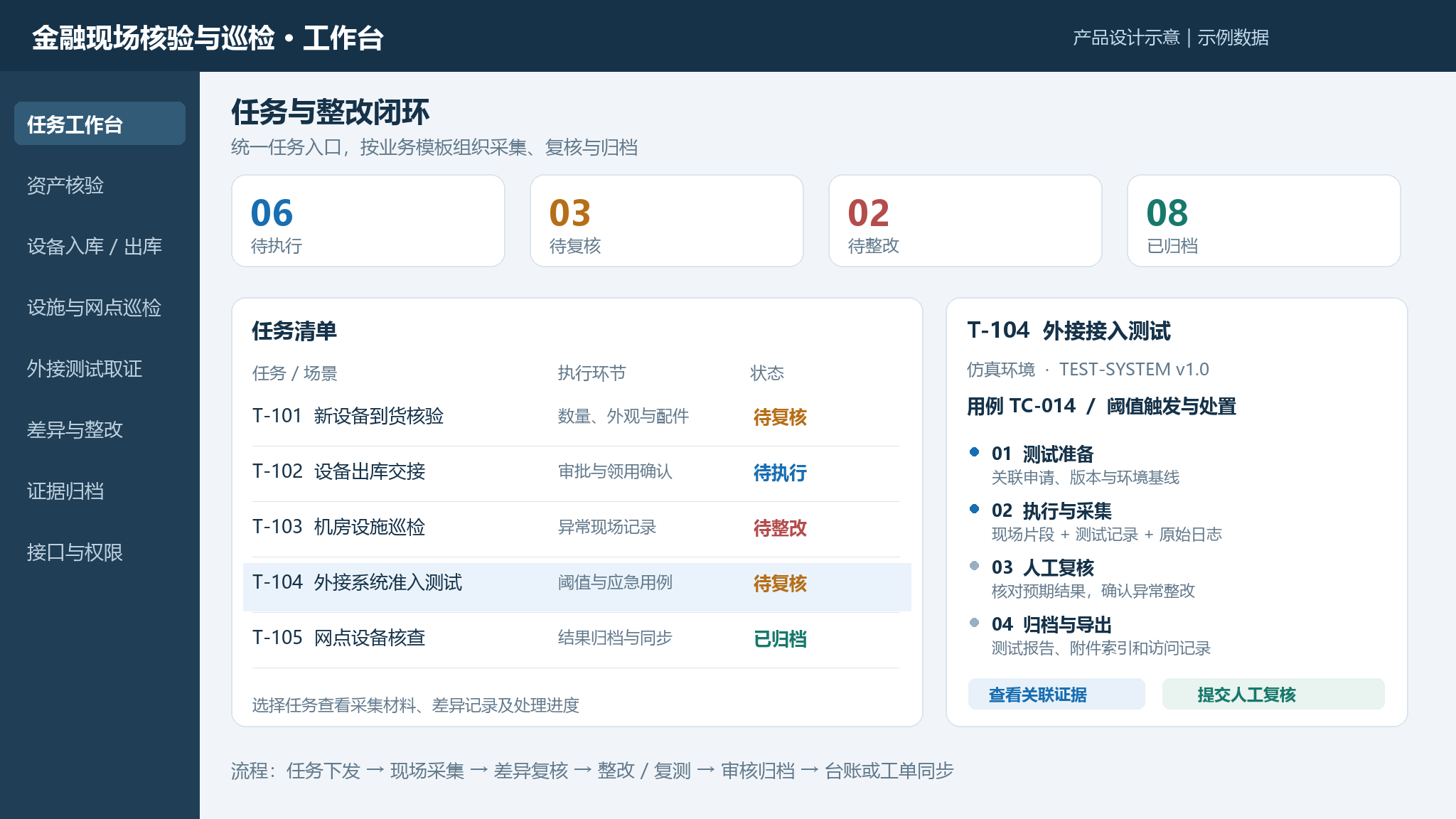
Inventory, inspection, inbound, outbound and acceptance testing pick their capture items from a task template. Field staff follow the task.
Product line · Field
From device checks and site inspections to issue handling and document archiving, every field visit leaves a record, a basis and a result.
Task workspace
Financial site verification and inspection · sample data
06
To run
03
To review
02
To fix
08
Archived
Inbound hardware verification
Quantity, condition, accessories
Equipment handover
Approval and recipient confirmation
Data hall inspection
On-site anomaly records
External system acceptance test
Threshold and fallback cases
Branch device check
Archiving and sync
Dispatch → field capture → discrepancy review → rectification and retest → approval and archiving → ledger or ticket sync
Integrations
Inventory, inspection, inbound, outbound and acceptance testing pick their capture items from a task template. Field staff follow the task.
Tag, serial number, nameplate and location are checked together. Anything inconsistent is routed to a person.
Records are stored locally when there is no signal, then synced. No second visit to re-capture.
A difference becomes a case with an owner and a deadline. Rectification is retested and written back to the task.
Photos, video, operation logs and review notes stay attached to the task, so nobody rebuilds a file afterwards.
Ledger import and export, plus integrations with CMDB and ITSM. Devices are chosen by site, not by vendor.
Coverage
One task template, applied to assets, inspection and acceptance testing.
Inbound acceptance, issue and handover, location checks, change evidence and post-count discrepancy review form one asset event chain.
Data halls, branches, outsourced work and drills: photos, video, location, time and people captured per task.
In an isolated simulation environment, test cases, field process, raw logs, retest and archived material are linked together.
Workflow
Six stages. Every stage leaves a record and a named owner.
Build the task from a template, pick the scenario and capture items, assign a person and a site.
OutputTask and capture items
Photo, video, scan and form entry. Location and time are stored with the record.
OutputPhotos, video and logs
Tag, serial number and location are compared with the ledger. Mismatches go to review.
OutputCheck results and differences
The reviewer sees the source material and the suggestion, then confirms or returns it.
OutputReview notes
A difference becomes a case with an owner and a deadline. Retest after the fix.
OutputRectification and retest
Closing material is stored with the task, and the ledger or ticket is updated.
OutputArchived evidence
Status model: to run / to review / to fix / archived
Use cases
Choose what to capture for each task. Field staff follow it, managers read the result.
Unboxing, quantity and accessory checks, recorded as the device enters the ledger.
For new hardware arrivals, expansions and partial deliveries. The record is created with the asset entry.
Who takes it, where it goes, whether accessories are complete, confirmed on site in one pass.
For issuing devices, transfers between sites and loans. Both sides confirm on the task.
Tag, serial number, location and ledger compared, differences flagged on the spot.
For periodic counts and targeted checks. Every difference becomes a rectification case.
Device status and on-site anomalies recorded, issues raised directly from the floor.
For daily rounds on data halls, power and cooling. Anomalies carry a photo and a location.
Head office dispatches the task, branches complete it on site, results roll up in one place.
For multi-site organisations running the same check. Progress rolls up by site.
Before and after states plus work scope recorded, reducing disputes over responsibility.
For construction, relocation and third-party maintenance, with scope captured alongside state.
People, process, issues and results kept together for the review afterwards.
For emergency and failover drills. Process records and review material live in one task.
Someone owns the issue, someone reviews the fix, the closing documents are complete.
For count discrepancies, inspection anomalies and retests. Status moves from to-fix to archived.
Test process, records, logs and retest results held in the same task.
For external system acceptance. Cases, process and raw logs are archived together.
Governance
Sites differ, so policy is set per project and per role.
FAQ
No. Phones, tablets and rugged handhelds all work. Devices are picked to match the site and the workload.
Ledger import and export are supported, and task results can be synced to CMDB, ITSM or a ticketing system through an API.
Records are stored locally and synced once there is a network. Nothing captured offline is lost.
Inbound, outbound, existence checks, data hall rounds, branch inspections, outsourced witnessing, drills, rectification and acceptance testing, all on the same task template.
Start with one data hall or one device type. Compare real working hours, discrepancy closing time and the time needed to retrieve evidence.
Next step
Tell us the field tasks, the capture items and the ledger you already have. We reply with a scope you can pilot.
Replies within one business day, 9:00–18:00 GMT+8.